|
Free download VistaSwitcher 1.1.3

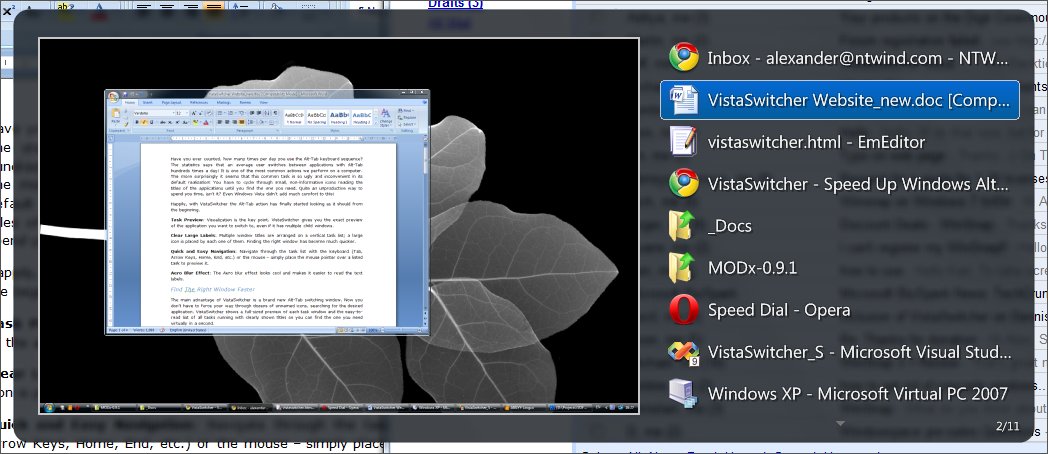
 VistaSwitcher replaces the default Windows Alt-Tab dialog with a nice box that shows a list of all running tasks, with their names and preview snapshots, and enables the user to take actions on them using the mouse and keyboard shortcuts. VistaSwitcher replaces the default Windows Alt-Tab dialog with a nice box that shows a list of all running tasks, with their names and preview snapshots, and enables the user to take actions on them using the mouse and keyboard shortcuts.
Task Preview: Visualization is the key point. VistaSwitcher gives you an exact preview of the application you want to switch to, even if it has multiple child windows.
Clear Large Labels: Multiple window titles are arranged on a vertical task list; text labels are easy to read, with a large application icon placed by each one of them.
Quick & Easy Navigation: Conveniently, you don?t have to press Alt+Tab repeatedly to finally select the required application. Navigation is much easier (and more intuitive, too); simply hover your mouse over the desired task or select it with the arrow keys on your keyboard. With VistaSwitcher, finding the right window is a breeze!
Switch Using Only the Mouse: You can easily configure VistaSwitcher to move between applications, using only the mouse. No keyboard shortcuts required! Just hold your right mouse button down and scroll the wheel up or down to select the window you want.
Manage Windows: With VistaSwitcher, you also have full control over any opened window, all within two clicks away. So, go ahead - minimize, maximize, restore, cascade, tile vertically or horizontally, close or even end the process! Moreover, you can select multiple windows and apply the same action to all of them simultaneously.
Instance Switcher: VistaSwitcher adds even more comfort to your everyday PC work by offering a feature that Mac users have already been enjoying for a long time. Now you can cycle through your open documents as easily as you do with your open applications, using Alt+` (Backtick) - just like on Mac OS.
What's more, VistaSwitcher supports multiple monitors and virtual desktops, too. Try this super-fast, eye-catching utility and never come back to the old awkward Alt-Tab dialog!
VistaSwitcher 1.1.3 system utilities, launchers & task managers software developed by NTWind Software. The license of this system utilities, launchers & task managers software is freeware, the price is 0.00, you can free download and get a free trial before you buy a license or registration. All VistaSwitcher 1.1.3 download links are direct VistaSwitcher full download from NTWind Software site or their selected mirrors.
Keywords: switch, windows, alt-tab, preview, snapshot, instance switcher, manage windows, multiple monitors, vista, , Freeware, System Utilities, Launchers & Task Managers, NTWind Software, VistaSwitcher
Recent Changes: Not Established
Install Support: Install and Uninstall
Supported Languages: English, Armenian, Bulgarian, Chinese, ChineseSimplified, ChineseTraditional, Czech, Danish, Dutch, Finnish, French, German, Italian, Japanese, Korean, Norwegian, Polish, Portuguese, Romanian, Russian, Spanish, Swedish, Turkish
Additional Requirements: Not Established
|




 (total votes: 0)


 TradeTrakker 2.93: Powerful investment tracking program to automatically track stocks/mutual funds
 JaSFtp 11.10: JaSFtp - Automated SFTP client (secure FTP), Run 1000+ tasks on a schedule.
 AbleFTP 11.10: AbleFtp - FTP client designed to automate and run 1000+ FTP tasks a day.
 Audio DVD Maker 1.0: Audio DVD Maker is an innovative utility for you to personalize your own DVD