|
Digital Image Tool 3.0 - Detailed Description Page |

|
Program ID: |
42856 |
Author: | Bruce McArthur All programs by this author |
Downloads: |
90 |
License: |
Freeware [?] |
Cost: |
$0.00 US |
Operating Systems: |
|
Size: |
5186K |
Release Status: |
update |
Last Updated: |
2011-07-20 |
Our Rating: |

|
Users Rating: |
(total votes: 0)
|
Feedback: |
Report broken download Report spyware [?] |
|
Digital Image Tool 3.0 download free
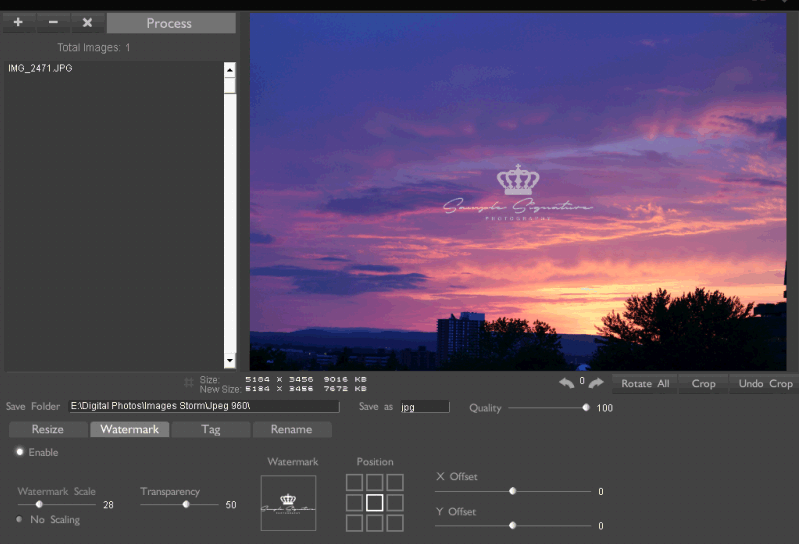
Batch process images quickly, applying flexible resizing methods, rotation, cropping, scaling, watermarking, renaming, tagging and more. Batch Image Resize
Either scale or apply max width or height settings, images are never scewed or scaled over 100%
Batch Image Rotation
Apply individual rotation or apply a particular rotation to all images.
Batch Image Watermark
Use built in or custom watermark using image of your choosing. Control watermark transparency as well as positioning, you can also tile as well. Use PNG's files which include their own transparency for best results.
Batch Image Tagging
Custom tag images with text in lower right corner with date, filename and or custome text, also you can control the transparency.
Batch Image Rename
Rename multiple image files with ease. Includes search and replace, suffix/prefix text, numbering and replacing blank spaces with a lowerdash.
Batch Image Cropping
Apply batch crop to images based on percentages. Automatically detect any images that may have been rotated and adjust crop accordingly.
Input
GIF TIF JPG BMP PSD PNG TGA
+ RAW many camera formats
Ouput
JPG TIF BMP PNG
Installer / Uninstaller
Simple install/uninstaller included
Please be aware that we do NOT provide Digital Image Tool crack, serial numbers, registration codes or any other forms of pirated software downloads. Using warez version, crack, warez passwords, patches, serial numbers, registration codes, key generator, pirate key, keymaker or keygen for Digital Image Tool license key is illegal and prevent future development of Digital Image Tool.
Keywords: batch image tool, images, image, photo, resize, crop, scale, rotate, batch, logo, digital, image tool, free, digital image tool, rename, watermark, tag, Freeware, Graphic Apps, Converters & Optimizers, Digital Image Tool, Bruce McArthur
Recent Changes: Watermarking, renaming, tagging, modified crop and resize
Install Support: Install and Uninstall
Supported Languages: English
Additional Requirements: Pentium 2, Windows
|
Latest Releases in Graphic Apps - Converters & Optimizers |
|
Love2Photo - compress pictures to share 1.87.8 (2013-05-20) update
Save time,money and effort sharing your live photo.Take advantage of the BEST photo compression method on the planet. Unite your photos into highly-compressed,easy to post or e-mail,albums and rich slideshows.Feel the love from your friends when they...
|
|
Mytoolsoft Watermark Software 2.9.0 (2013-03-22) update
The useful watermark software & batch watermark software & easy watermark software. Add text watermark or image watermark to your images quickly and easily. such as multiline text, angle, margins, tile, shadow and opacity. resize output image...
|
|
Universal Document Converter 5.6 (2013-03-13) update
Universal Document Converter is the most complete solution for the conversion of documents into PDF, JPEG, TIFF or other graphical files. The underlying basis of the program is the technology of virtual printing. As a result, exporting documents into...
|
|
PDF Split-Merge Command Line 6.3 (2013-03-07) new
PDF Split-Merge is a perfect tool for split, merge, and manage your PDF files, that can helps you split large PDF files into smaller PDF files, and merge one or more PDF files.
it is the fast, affordable way to split files by pages, you can sp...
|
|
pdf encrypt Converter 5.0 (2013-03-07) new
PDF Encrypt software is a very flexible and powerful program, it allows you to encrypt (using standard 40-bit or 128-bit or AES encryption) existing PDFs, set permissions, add user and owner password. For example you can encrypt a PDF without allowin...
|
|
pdf encrypt command line 5.0 (2013-03-07) new
PDF Encrypt software is a very flexible and powerful program, it allows you to encrypt (using standard 40-bit or 128-bit or AES encryption) existing PDFs, set permissions, add user and owner password. For example you can encrypt a PDF without allowin...
|
|
pdf encrypt gui+cmd 5.0 (2013-03-07) new
PDF Encrypt software is a very flexible and powerful program, it allows you to encrypt (using standard 40-bit or 128-bit or AES encryption) existing PDFs, set permissions, add user and owner password. For example you can encrypt a PDF without allowin...
|
|
pdf to ps command line 5.2 (2013-03-07) new
Convert PDF to vector PS, EPS.
Convert PDF to Raster PS, EPS.
Support the encrypted PDF file.
Accurately preserve text, pictures, and layout of the original PDF.
Support specifies page range.
Support sets the PostSc...
|
|
pdf to ps gui+cmd 5.2 (2013-03-07) new
Convert PDF to vector PS, EPS.
Convert PDF to Raster PS, EPS.
Support the encrypted PDF file.
Accurately preserve text, pictures, and layout of the original PDF.
Support specifies page range.
Support sets the PostSc...
|
|
PCL To IMAGE Command Line 5.5 (2013-03-07) update
PCL To IMAGE Converter is a perfect convert tool for PCL and PXL print files, which can helps you convert PCL and PXL print files to image formats, such as TIF, TIFF, JPG, GIF, PNG, BMP, EMF, PCX, WMF and so on.
PCL To IMAGE Converter is the f...
|
|
XPS To PDF gui+command line 5.5 (2013-03-07) update
Convert XPS to PDF (Portable Document Format).
Full XPS color support.
XPS Converter produces PDF documents that are fully text searchable in Adobe Reader.
Smallest PDF file size within conversion.
Merge multiple XPS files...
|
|
XPS To PDF command line 5.5 (2013-03-07) update
Convert XPS to PDF (Portable Document Format).
Full XPS color support.
XPS Converter produces PDF documents that are fully text searchable in Adobe Reader.
Smallest PDF file size within conversion.
Merge multiple XPS files...
|
|
XPS To PDF Converter 5.5 (2013-03-07) update
Convert XPS to PDF (Portable Document Format).
Full XPS color support.
XPS Converter produces PDF documents that are fully text searchable in Adobe Reader.
Smallest PDF file size within conversion.
Merge multiple XPS files...
|
|
XPS To IMAGE gui+command line 5.5 (2013-03-07) update
XPS To IMAGE Converter is a perfect convert tool for XPS files, which can helps you convert XPS files to image formats, such as TIF, TIFF, JPG, GIF, PNG, BMP, EMF, PCX, WMF and so on....
|
|
XPS To IMAGE command line 5.5 (2013-03-07) update
XPS To IMAGE Converter is a perfect convert tool for XPS files, which can helps you convert XPS files to image formats, such as TIF, TIFF, JPG, GIF, PNG, BMP, EMF, PCX, WMF and so on....
|
|
XPS To TIFF command line 5.5 (2013-03-07) update
XPS To TIFF Converter is a perfect convert tool for XPS files, which can helps you convert XPS files to TIFF (Tagged Image File Format).
XPS To TIFF Converter is the fast, affordable way to convert a lot of XPS files to popular image format on...
|
|
pdf to image Converter 6.7 (2013-03-07) update
PDF To IMAGE Converter is a perfect convert tool for PDF documents, which can helps you convert PDF documents to image formats, such as TIF, TIFF, JPG, GIF, PNG, BMP, EMF, PCX, WMF and so on. Original document layout is fully preserved. Original PDF ...
|
|
jpeg To pdf Converter command line 6.5 (2013-03-07) update
JPEG To PDF Converter is a perfect convert tool designed to convert JPEG into PDF files, which can helps you convert your photos, drawings, scanned and faxed images into Acrobat PDF documents....
|
|
XPS To TIFF gui+command line 5.5 (2013-03-07) update
XPS To TIFF Converter is a perfect convert tool for XPS files, which can helps you convert XPS files to TIFF (Tagged Image File Format).
XPS To TIFF Converter is the fast, affordable way to convert a lot of XPS files to popular image format on...
|
|
pdf to jpeg Converter command line 6.7 (2013-03-07) update
PDF To JPEG Converter is a perfect convert tool for PDF documents, which can helps you convert PDF documents to JPEG (Joint Photographic Experts GROUP). Original document layout is fully preserved. Original PDF formatting and interrelation of text an...
|
|
|